
nagiosでフリーな監視をしてみよう!~nagiosの構築(4)~
apacheの設定
apacheの設定を行っていきます。
この設定を行わないと、nagiosのweb画面が表示されません。
(1)apacheユーザーをnagiosグループに所属させる設定を行います。
# usermod -G nagios apache
# id apache
uid=48(apache) gid=48(apache) 所属グループ=48(apache),500(nagios)
(2)Apache設定ファイルを編集します。
# vi /usr/local/apache2/conf/httpd.conf
・「httpd.conf」ファイル変更前の内容
 #LoadModule asis_module modules/mod_asis.so
 #LoadModule info_module modules/mod_info.so
 #LoadModule cgid_module modules/mod_cgid.so
 #LoadModule dav_fs_module modules/mod_dav_fs.so
     # To use CGI scripts outside of ScriptAliased directories:
     # (You will also need to add "ExecCGI" to the "Options" directive.)
     #
     #AddHandler cgi-script .cgi
・「httpd.conf」ファイル変更後の内容
 #LoadModule asis_module modules/mod_asis.so
 #LoadModule info_module modules/mod_info.so
 LoadModule cgid_module modules/mod_cgid.so
 #LoadModule dav_fs_module modules/mod_dav_fs.so
     # To use CGI scripts outside of ScriptAliased directories:
     # (You will also need to add "ExecCGI" to the "Options" directive.)
     #
     AddHandler cgi-script .cgi
    518 AddType application/x-httpd-php .php .phtml
    519 # nagios settings
    520 Include conf/extra/nagios.conf
    521 Header always append X-FRAME-OPTIONS "SAMEORIGIN"
(3)Nagios用のApache設定ファイルを編集します。
# vi /usr/local/apache2/conf/extra/nagios.conf
・「nagios.cfg」ファイル変更前の内容
 <Directory "/usr/local/nagios/sbin">
 #  SSLRequireSSL
    Options ExecCGI
    AllowOverride None
    Order allow,deny
    Allow from all
 #  Order deny,allow
 #  Deny from all
 #  Allow from 127.0.0.1
    AuthName "Nagios Access"
    AuthType Basic
    AuthUserFile /usr/local/nagios/etc/htpasswd.users
    Require valid-user
 </Directory>

 Alias /nagios "/usr/local/nagios/share"

 <Directory "/usr/local/nagios/share">
 #  SSLRequireSSL
    Options None
    AllowOverride None
    Order allow,deny
    Allow from all
 #  Order deny,allow
 #  Deny from all
 #  Allow from 127.0.0.1
    AuthName "Nagios Access"
    AuthType Basic
    AuthUserFile /usr/local/nagios/etc/htpasswd.users
    Require valid-user
 </Directory>
・「nagios.cfg」ファイル変更後の内容
 <Directory "/usr/local/nagios/sbin">
 #  SSLRequireSSL
    Options ExecCGI
    AllowOverride None
 #   Order allow,deny
 #   Allow from all
    Require all granted
 #  Order deny,allow
 #  Deny from all
 #  Allow from 127.0.0.1
    AuthName "Nagios Access"
    AuthType Basic
    AuthUserFile /usr/local/nagios/etc/htpasswd.users
    Require valid-user
 </Directory>

 Alias /nagios "/usr/local/nagios/share"

 <Directory "/usr/local/nagios/share">
 #  SSLRequireSSL
    Options None
    AllowOverride None
 #   Order allow,deny
 #   Allow from all
    Require all granted
 #  Order deny,allow
 #  Deny from all
 #  Allow from 127.0.0.1
    AuthName "Nagios Access"
    AuthType Basic
    AuthUserFile /usr/local/nagios/etc/htpasswd.users
    Require valid-user
 </Directory>
(4)設定ファイル修正の変更内容を反映させるために、apacheの再起動を行います。
# service httpd restart
httpd を停止中:                                            [  OK  ]
httpd を起動中:                                            [  OK  ]
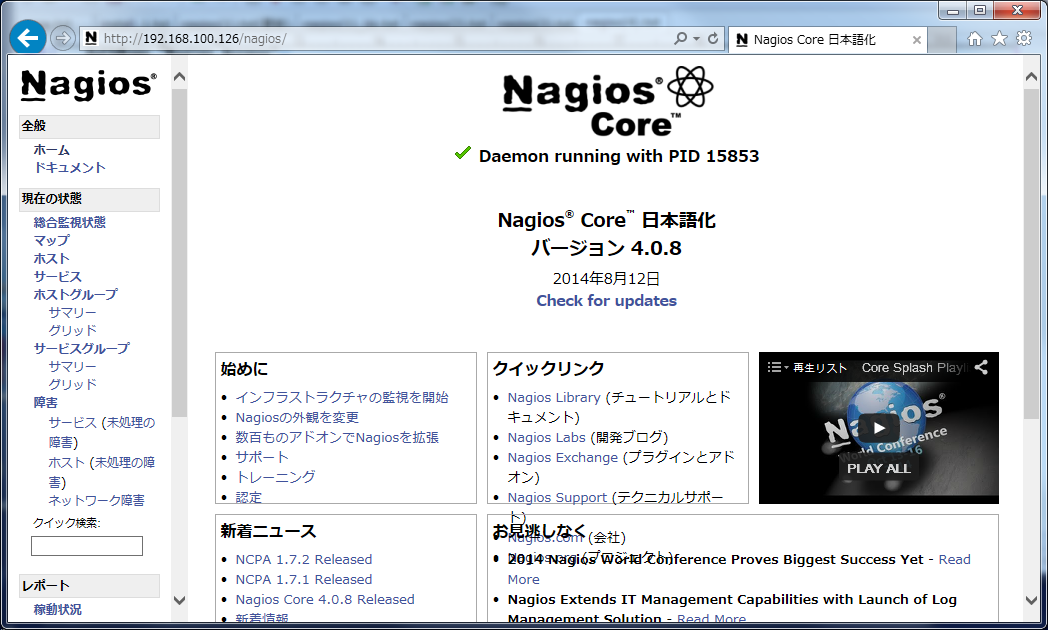
(5)「http://(IPアドレス)/nagios」にアクセスして、web画面が表示されたら成功となります。
※ユーザー名とパスワードの入力画面が表示されますので、先ほど設定したユーザー名とパスワードを入力してください。
次回は、PHPのインストールを説明していきたいと思います。








