
HTML5 Chromeで動作するindexedDB サンプル2 【入門編 第3回】
indexedDBサンプルソース第2弾
今回はソース全体を。
このソースはjqueryを利用しています。

jQueryを利用したソース
indexedDB.htmlの内容
<!DOCTYPE html>
<html lang="ja">
<head>
<meta charset="UTF-8">
<title>indexedDB</title>
<script type="text/javascript" src="js/jquery.min.js" charset="UTF-8"></script>
<meta http-equiv="Content-Style-type" content="text/css" />
<link rel="stylesheet" href="css/style.css" type="text/css" media="all" />

<script type="text/javascript">
	var idbProp	= {
		ver : '1.0',
		name : 'idbSample',
		storeName : 'keyStore'
	};

	var idb			= null;

	$(document).ready(function(){
		/* Chromeのみなので、こんな書き方をしなくても良いのですが。 */
		if (window.indexedDB || window.webkitIndexedDB || window.mozIndexedDB) {
			var indexedDB		= window.indexedDB || window.webkitIndexedDB || window.mozIndexedDB;
			var IDBTransaction	= window.IDBTransaction || window.webkitIDBTransaction || window.mozIDBTransaction;
			var IDBKeyRange		= window.IDBKeyRange || window.webkitIDBKeyRange || window.mozIDBKeyRange;
			var IDBCursor		= window.IDBCursor || window.webkitIDBCursor;

			/* IndexedDBをオープンします。*/
			var IDBreq	= indexedDB.open(idbProp.name);
		} else {
			alert('このブラウザではindexedDB は利用できません');
		}

		/* IndexedDBオープン成功時に呼び出されるコールバック関数 */
		IDBreq.onsuccess	= function (event) {
			idb	= this.result;
			/* IndexedDBのバージョン・チェック */
			if (idbProp.ver != idb.version) {
				/* IndexedDBにバージョンをセット */
				var req	= idb.setVersion(idbProp.ver);
				/* バージョン・セット成功時に呼び出されるコールバック関数 */
				req.onsuccess	= function (event) {
					/* オブジェクト・ストアの作成 */
					var store	= idb.createObjectStore(
						idbProp.storeName,
						{ keyPath: 'sKey', autoIncrement: false }
					);
					/* 検索キーを作成します */
					var index	= store.createIndex('indexKey', 'sKey');
				};
			}
		};

		$('#set').click(function(){
			/* ボタンを押下しデータを登録します。 */
			var trans	= idb.transaction(idbProp.storeName, IDBTransaction.READ_WRITE);
			var store	= trans.objectStore(idbProp.storeName);

			/* データの内容 */
			var data	= {
				sKey : $('#skey').val(),
				title : $('#title').val(),
				content : $('#content').val(),
				postDate : getDate()
			};
			/* データをセットします */
			var res	= store.put(data);
		});

		$('#show').click(function(){
			var key		= $('#getkey').val();
			/* トランザクション経由でオブジェクトの取得 */
			var trans	= idb.transaction(idbProp.storeName, IDBTransaction.READ_WRITE);
			var store	= trans.objectStore(idbProp.storeName);
			var req		= store.get(key);

			req.onsuccess = function (event) {
				if (this.result === undefined) {
					alert('指定キーで保存されているデータはありません');
				} else {
					listout(this.result.sKey, this.result.title, this.result.content, this.result.postDate, false);
				}
			};
		});

		$('#showIndex').click(function(){
			/* レンジの作成 */
			var range	= IDBKeyRange.bound('0', '99999999');
			var trans	= idb.transaction(idbProp.storeName, IDBTransaction.READ_WRITE);
			var store	= trans.objectStore(idbProp.storeName);

			/* インデックスからデータを検索し取得 */
			var req		= store.openCursor(range, IDBCursor.NEXT);
			$('#list').html('');

			req.onsuccess	= function (event) {
				if (this.result === undefined) {
					/* データが無い場合の処理 */
					alert('検索結果がありません。');
				} else {
					if(this.result != null){
						listout(this.result.value.sKey, this.result.value.title, this.result.value.content, this.result.value.postDate, true);
						/* 次の検索結果でonsuccessコールバック関数を呼び出す */
						this.result.continue();
					}
				}
			};
		});
	});

	function listout(sKey, title, content, postDate, add){
		var cont = content.replace(/rn/g, '<br />');
		cont = cont.replace(/(n|r)/g, '<br />');
		$('#list').html(
			(add ? $('#list').html() : '') +
			'<li>[' + sKey + ']<br/><strong>' + title + '</strong><br/>' + cont + '<br/>登録日(' + postDate + ')</li>'
		);
	}

	function getDate(){
		var date = new Date();
		var year = date.getFullYear();
		var month = date.getMonth() + 1;
		var day = date.getDate();

		if ( month < 10 ) {
			month = '0' + month;
		}
		if ( day < 10 ) {
			day = '0' + day;
		}

		return year + '/' + month + '/' + day;
	}

</script>

</head>
<body>
<h1>indexedDBサンプル</h1>
<br/>
<div>
<table>
	<tr>
		<th>日付</th>
		<td><input type="text" id="skey" />(YYYYMMDD形式)</td>
	</tr>
	<tr>
		<th>タイトル</th>
		<td><input type="text" id="title" /></td>
	</tr>
	<tr>
		<th>詳細内容</th>
		<td><textarea id="content"></textarea></td>
	</tr>
	<tr>
		<th colspan="2"><input type="button" id="set" value="設定" /></th>
	</tr>
</table>
</div>
<br />
<hr />
<div>
取得したい値のキーを入力してください。<input type="text" id="getkey" />
<input type="button" id="show" value="値の取得" />
<input type="button" id="showIndex" value="一覧の取得" />
</div>
<div>
<ul id="list">
</ul>
</div>
</body>
</html>
style.cssの内容
* {font-size:12px; color: #666; margin:3px; padding:0px;}

input[type=button]{width:120px;height:30px;}
input[type=text]{width:350px;padding:3px;background:#fff;}
textarea{width:550px;height:150px;padding:3px;background:#fff;}

table th {background:#fff;padding:5px;}
table td {background:#fff;padding:5px;}

div{margin-left:30px;line-height:20px;}

li{background:#eee;border:1px solid #aaa;list-style-type:decimal;margin-right:30px;padding:10px;}
随分と雑なcssで申し訳ないです。
実際の画面はこんな感じです。
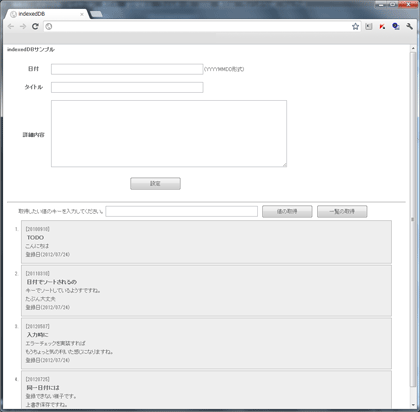
さて、indexedDBですが、処理の概要を簡単に説明します。
まず、ストアに対してのデータの追加/値の取得に関しては以下の図のようになります。

KeyRangeに対して検索する場合は、以下の図のようになります。

説明が簡単で、Chromeでしか動作しないサンプルですが、少ないサンプルの中で何かの役に立つことを
願ってやまない今日この頃です。
今後はlocalStorageに関して調査をしていこうと思います。








