
![Android UI 基本 ラジオボタン[RadioButton]](https://tech.pjin.jp/wp-content/uploads/2015/09/Android_page.png)
Androidアプリを作る上で必要な基本的なUIの使い方を解説します。
ラジオボタン
ユーザの複数の選択肢から一つ選んでもらう時に用いるウィジェットがRadioButtonです。
Spinnerも同様の働きをしますが、選択肢を横並びで一斉に表示したいときはRadioButtonを使います。
レイアウトxmlにRadioButtonを配置します。
...
    <RadioButton
        android:id="@+id/apple"
        android:layout_width="wrap_content"
        android:layout_height="wrap_content"
        android:text="りんご"/>

    <RadioButton
        android:id="@+id/orange"
        android:layout_width="wrap_content"
        android:layout_height="wrap_content"
        android:text="みかん"/>

    <RadioButton
        android:id="@+id/grape"
        android:layout_width="wrap_content"
        android:layout_height="wrap_content"
        android:text="ぶどう"/>
...
一見これで良さそうに見えるのですが、これだと選択肢が排他的になりません。
全部選べる上に一度選ぶとチェックを外すことができなくなります.
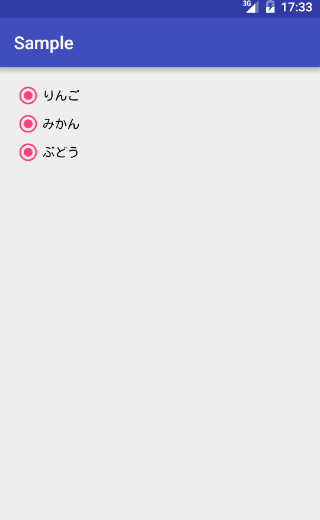
ラジオボタンは排他的であるのが普通なので、これを次のように修正します。
    <RadioGroup
        android:id="@+id/radio_group"
        android:layout_width="wrap_content"
        android:layout_height="wrap_content"
        android:orientation="vertical">

        <RadioButton
            android:id="@+id/apple"
            android:layout_width="wrap_content"
            android:layout_height="wrap_content"
            android:text="りんご"/>

        <RadioButton
            android:id="@+id/orange"
            android:layout_width="wrap_content"
            android:layout_height="wrap_content"
            android:text="みかん"/>

        <RadioButton
            android:id="@+id/grape"
            android:layout_width="wrap_content"
            android:layout_height="wrap_content"
            android:text="ぶどう"/>

    </RadioGroup>
選択肢である複数のRadioButtonをRadioGroupで囲ってあげます。
また、各RadioButtonにidを必ず付与しておいてください。
これで各選択肢が自動的に排他的な動きをしてくれるようになります。
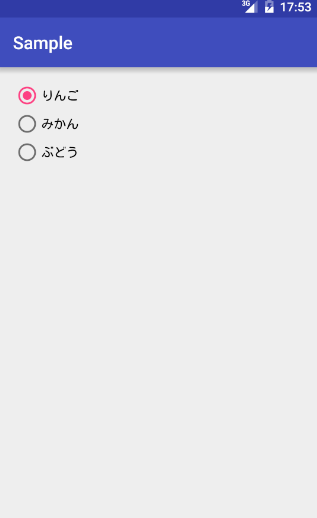
onCheckedChanged
        RadioGroup radioGroup = (RadioGroup) findViewById(R.id.radio_group);
        radioGroup.setOnCheckedChangeListener(new RadioGroup.OnCheckedChangeListener() {
            @Override
            public void onCheckedChanged(RadioGroup radioGroup, int checkedRadioButtonId) {
                RadioButton checkedButton = (RadioButton)findViewById(checkedRadioButtonId);
                Toast.makeText(MainActivity.this, checkedButton.getText(), Toast.LENGTH_SHORT).show();
            }
        });
ユーザにより選択が変更された時のイベントを検知するには、
RadioGroup.OnCheckedChangeListenerインターフェースを実装し、RadioGroup#setOnCheckedChangeListenerで
RadioGroupに渡してあげればOKです。
メソッドonCheckedChangedの第二引数に選択されたRadioButtonのid(int)が渡ってきます。
このidを用いてにRadioButtonのインスタンスを取得することが可能です。
また、現在選択されているRadioButtonを知りたい時は次のように取得できます。
        int checkedRadioButtonId = radioGroup.getCheckedRadioButtonId();
        RadioButton checkedButton = (RadioButton)findViewById(checkedRadioButtonId);








