

1.親子関係とは
Unityのオブジェクトは親子関係を持つことができます。
…と言われても、あまりピンと来ないですね。
この親子関係を正確に定義しようとすると難しいですが、親子関係によって何ができるのかはとても単純に説明できます。
結論から言うと、
複数のオブジェクト間に親子関係が設定されている場合、子オブジェクトは親オブジェクトに追従するようになります。
より正確に言うならば、親オブジェクトが動いたときに、子オブジェクトは親オブジェクトとの相対位置を保つように動くようになります。
2.ヒエラルキービューでの操作方法
■親子関係の構築
親子関係はヒエラルキービューで簡単に設定することができます。
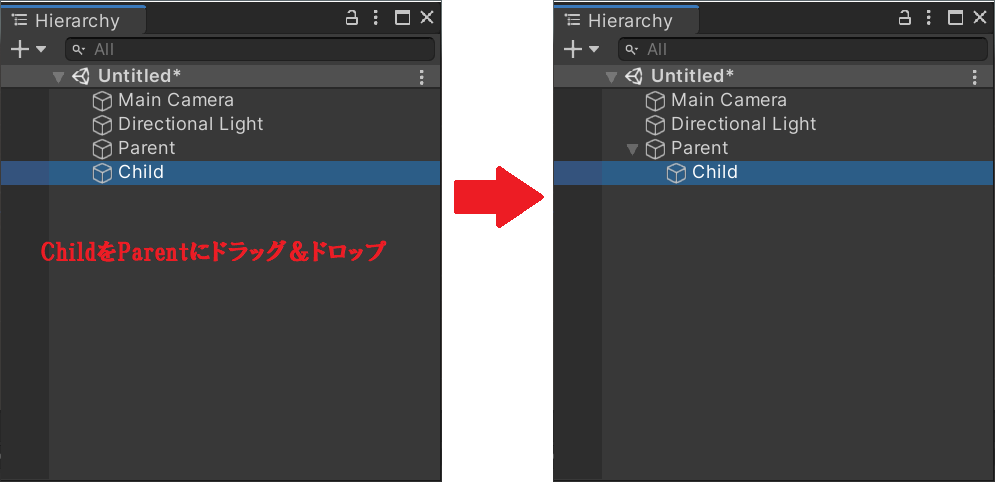
親オブジェクト(として設定したいオブジェクト)に子オブジェクト(として設定したいオブジェクト)をドラッグアンドドロップします。
すると、オブジェクトが階層化されます。
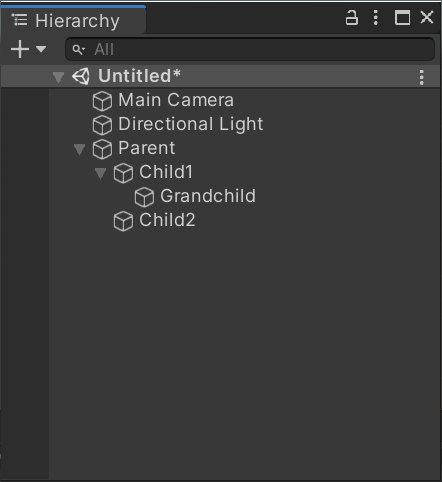
親は子を複数持てますし、孫(子の子)を持つこともできます。
逆に、子が複数の親を持つことはできません。
なお、親子関係の頂点のオブジェクト(画像のParentオブジェクト)をルートオブジェクトと呼びます。
余裕があったら覚えてください。
■親子関係の解除
解除方法も簡単です。
子オブジェクトをドラッグアンドドロップで親オブジェクトから離してあげることで、親子関係は解消されます。
3.スクリプトによる操作方法
■親子関係の構築
子オブジェクト側から親オブジェクトを設定します。
using UnityEngine;
using System.Collections;

public class Child : MonoBehaviour {

    void Start () {
        this.gameObject.transform.parent = GameObject.Find("Parent").transform;
    }

}
■親子関係の解除
子オブジェクト側から親オブジェクトを設定する際に、nullを指定します。
using UnityEngine;
using System.Collections;

public class Child : MonoBehaviour {

    void Start () {
        this.gameObject.transform.parent = null;
    }

}
あるいは、親オブジェクト側から解除することもできます。
using UnityEngine;
using System.Collections;

public class Parent : MonoBehaviour {

    void Start () {
        this.gameObject.transform.DetachChildren();
    }

}
■親オブジェクトの取得
自身の親をスクリプトで取得できます。
using UnityEngine;
using System.Collections;

public class Child : MonoBehaviour {

    private GameObject parent;

    void Start(){
        parent = this.gameObject.transform.parent.gameObject;

    }
}
親子関係の頂点のオブジェクト(ルートオブジェクト)も取得できます。
using UnityEngine;
using System.Collections;

public class Child : MonoBehaviour {

    private GameObject root;

    void Start(){
        root = this.gameObject.transform.root.gameObject;

    }
}
■子オブジェクトの取得
自身の子をスクリプトで取得できます。
using UnityEngine;
using System.Collections;

public class Parent : MonoBehaviour {

    private GameObject child;

    void Start(){
        child = transform.FindChild ("Child").gameObject;

    }
}


