
PDO⑯ INを使用したサンプル
INを使用したサンプルシステムをご紹介します。
データは別の記事で使用しているものを使用します。
以下リンクの下部にある「動作環境について」の項目から環境を作成してください。
SQL練習問題 – 一覧まとめ
■要件
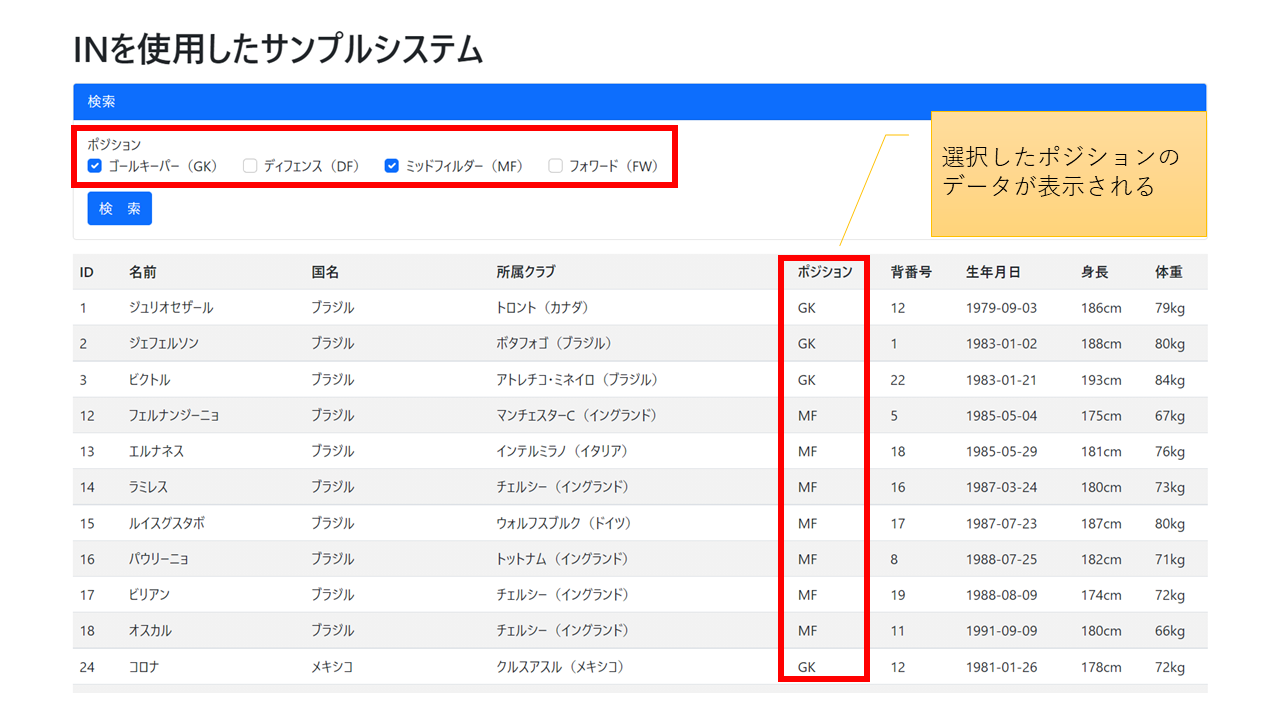
- サッカー選手の一覧が表示される
- チェックを入れて検索すると、選択したポジションの選手が表示される
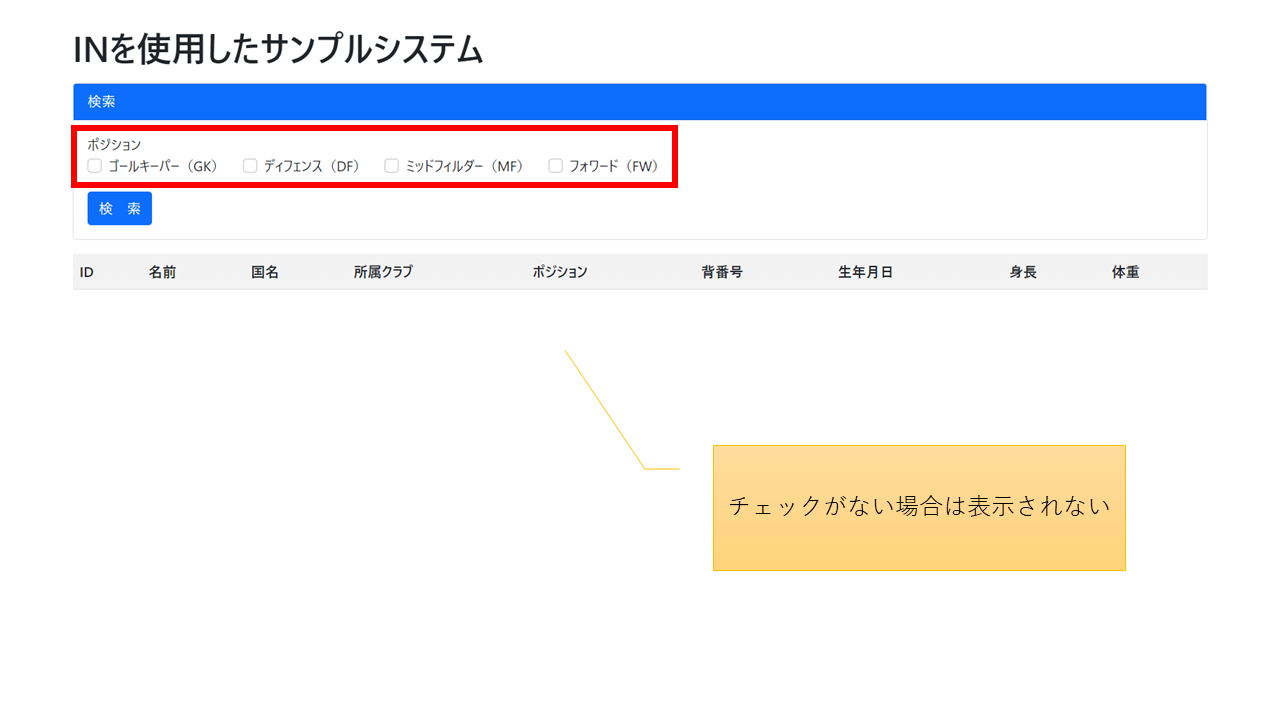
- チェックを入れずに検索した場合はヒットしない
- チェックは検索ボタンを押下後もチェックが状態が維持される
■プログラム
※デザインにBootstrap5を使用しています。
pdo_in.php
<?php
    try {

        // 接続処理
        $dsn = 'mysql:host=localhost;dbname=worldcup2014';
        $user = 'root';
        $password = '';
        $dbh = new PDO($dsn, $user, $password);

        // SELECT文を発行
        $sql = <<<EOM
            SELECT
                p.id AS playerId
                , p.name AS playerName
                , c.name AS countryName
                , p.club
                , p.position
                , p.uniform_num AS uniformNum
                , p.birth
                , p.height
                , p.weight
            FROM
                players p JOIN countries c
                    ON p.country_id = c.id
            WHERE
                p.position IN (%s)
        EOM;

        // チェックされたポジションを配列で取得。取得できない場合は、空の要素を1つ持つ(SQLの構文エラー対策)
        $positions = isset($_GET['positions']) ? $_GET['positions'] : array('');

        // 配列の要素の数だけIN内の?をカンマ区切りで生成し%s部分をprintf関数で置換
        $sql = sprintf($sql, substr(str_repeat(',?', count($positions)), 1));

        $stmt = $dbh->prepare($sql);

        // ?マークをバインド
        for($i = 0; $i < count($positions); $i++){
            $stmt->bindParam($i + 1, $positions[$i]);
        }
        $stmt->execute();
        $rows = $stmt->fetchAll(PDO::FETCH_OBJ); // 全てのレコードを取得

        // 接続切断
        $dbh = null;

    } catch (PDOException $e) {
        print $e->getMessage() . "<br/>";
        die();
    }
?>

<!DOCTYPE html>
<html>
    <head>
        <meta charset="UTF-8">
        <link href="https://cdn.jsdelivr.net/npm/bootstrap@5.0.0-beta1/dist/css/bootstrap.min.css" rel="stylesheet" integrity="sha384-giJF6kkoqNQ00vy+HMDP7azOuL0xtbfIcaT9wjKHr8RbDVddVHyTfAAsrekwKmP1" crossorigin="anonymous">
        <title>INを使用したサンプルシステム</title>
    </head>
    <body>
        <div class="container">

            <div class="h1 mb-3">INを使用したサンプルシステム</div>


            <div class="card mb-3">
                <div class="card-header bg-primary text-white">
                    検索
                </div>
                <div class="card-body">
                    <form action="">

                        <div class="row mb-3">
                            <label class="form-check-label" for="">ポジション</label>
                            <div class="col-12">
                                <div class="form-check form-check-inline">
                                    <input class="form-check-input" type="checkbox" name="positions[]" value="GK" id="GK" <?php print(in_array('GK', $positions) ? 'checked' : '' ) ?>>
                                    <label class="form-check-label" for="GK">ゴールキーパー(GK)</label>
                                </div>
                                <div class="form-check form-check-inline">
                                    <input class="form-check-input" type="checkbox" name="positions[]" value="DF" id="DF" <?php print(in_array('DF', $positions) ? 'checked' : '' ) ?>>
                                    <label class="form-check-label" for="DF">ディフェンス(DF)</label>
                                </div>
                                <div class="form-check form-check-inline">
                                    <input class="form-check-input" type="checkbox" name="positions[]" value="MF" id="MF" <?php print(in_array('MF', $positions) ? 'checked' : '' ) ?>>
                                    <label class="form-check-label" for="MF">ミッドフィルダー(MF)</label>
                                </div>
                                <div class="form-check form-check-inline">
                                    <input class="form-check-input" type="checkbox" name="positions[]" value="FW" id="FW" <?php print(in_array('FW', $positions) ? 'checked' : '' ) ?>>
                                    <label class="form-check-label" for="FW">フォワード(FW)</label>
                                </div>
                            </div>
                        </div>

	                    <button type="submit" class="btn btn-primary">検 索</button>
                    </form>
                </div>
            </div>


            <table class="table table-striped">
                <tr>
                    <th>ID</th>
                    <th>名前</th>
                    <th>国名</th>
                    <th>所属クラブ</th>
                    <th>ポジション</th>
                    <th>背番号</th>
                    <th>生年月日</th>
                    <th>身長</th>
                    <th>体重</th>
                </tr>

        <?php
            if($rows) {
                foreach($rows as $row){
        ?>
                <tr>
                    <td><?php print($row->playerId) ?></td>
                    <td><?php print($row->playerName) ?></td>
                    <td><?php print($row->countryName) ?></td>
                    <td><?php print($row->club) ?></td>
                    <td><?php print($row->position) ?></td>
                    <td><?php print($row->uniformNum) ?></td>
                    <td><?php print($row->birth) ?></td>
                    <td><?php print($row->height) ?>cm</td>
                    <td><?php print($row->weight) ?>kg</td>
                </tr>
        <?php
                }
            }
        ?>
        </div>
        <script src="https://cdn.jsdelivr.net/npm/bootstrap@5.0.0-beta1/dist/js/bootstrap.bundle.min.js" integrity="sha384-ygbV9kiqUc6oa4msXn9868pTtWMgiQaeYH7/t7LECLbyPA2x65Kgf80OJFdroafW" crossorigin="anonymous"></script>
    </body>
</html>
■解説
30行目
チェックなしの場合はarray('');となり、空文字の要素が1つ追加されます。
これがないと、発行されるSQLのINが
IN ()
となってSQLの構文エラーとなってしまいます。
空文字を追加することにより、発行されるSQLが
IN ('')
となり、エラーにならなくなります。